
How to Send USDT TRC-20 from Ledger and Reduce the Fee with TRON Energy

Owners of Ledger hardware wallets are especially careful about the security of their funds, so many are wary of any external services involved in crypto transfers. At the same time, USDT Ledger TRC20 remains one of the most frequent operations for those who keep the stablecoin in cold storage. Let's look at how a USDT transfer from Ledger works, why a fee arises and how to reduce it without putting your private keys at risk.
How USDT TRC-20 Works on Ledger
Ledger stores the private key inside the device's secure chip and never exposes it. A separate app on the device is used to work with TRON and the USDT token. The management interface is usually provided by a third-party wallet connected to the Ledger. The transaction itself is signed on the device, and only the finished, signed operation is sent to the network. This setup protects funds even when working through an untrusted computer. But it does not override the basic rules of the TRON network, including resource consumption with every token transfer.
Why a Transfer Requires Energy
A USDT transfer is a smart contract operation, not a direct transfer of coins. Every such call consumes Energy, and the amount depends on the conditions of the transaction. If the Ledger address has no resource reserve, the network automatically burns TRX to cover the shortfall. This is what shows up as the Ledger USDT fee. Hardware wallet owners often see this fee for the first time precisely on their first transfer, since before that they only bought and held the token. Understanding how network resources work lets you prepare the address in advance and avoid unnecessary costs.
What to Prepare Before the Transaction
Before sending USDT from Ledger, it is worth checking a few parameters so that the operation goes through without delays:
- up-to-date device firmware and the TRON app installed, since an outdated version may display transaction data incorrectly;
- the exact recipient address, copied rather than typed by hand, since a mistake in a TRON address cannot be undone;
- enough energy on the public address, otherwise the fee will be charged in TRX at the network's standard rate;
- a stable connection between the device and your computer or phone for the entire time the operation is being signed.
These checks take little time but rule out most technical failures on your first transfer.
How to Get Energy to Your Ledger TRON Address
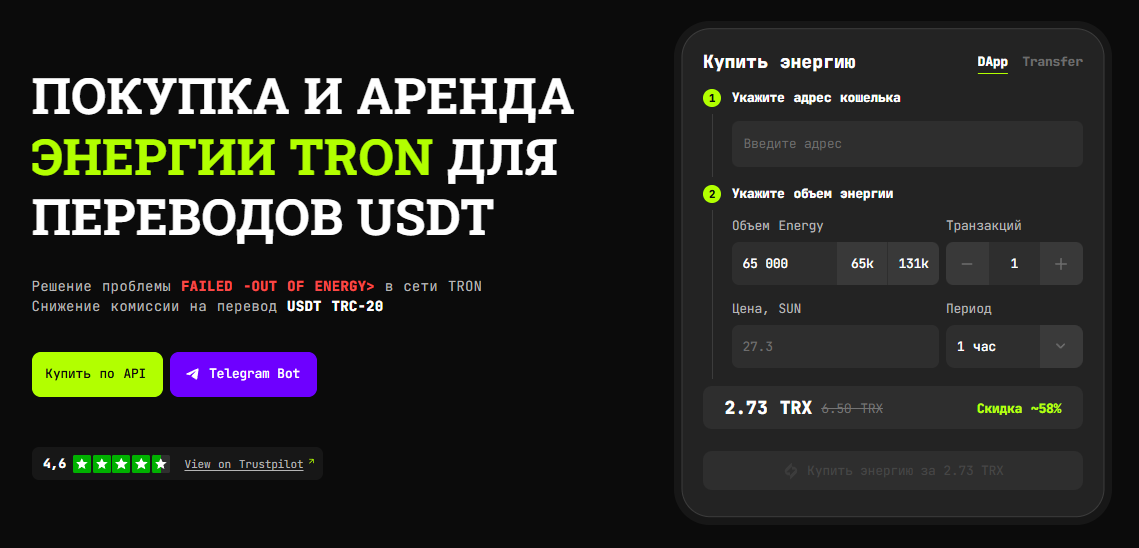
Energy can be delegated to a Ledger TRON address just like any other address on the network. To do this, the user enters their public TRON address in FeeSaver and selects the required amount of the resource. The service calculates the rental cost, which in many cases lets you reduce costs compared to paying the network fee by burning TRX. After payment, the resource arrives at the address within a few minutes. You do not need to connect the Ledger device itself or confirm anything on its screen.
How to Check That the Resource Is Available
Before sending USDT, make sure the energy has actually been credited to the address. You can check this through any public TRON blockchain explorer by entering your Ledger account address. The relevant section will show the current energy and bandwidth values. If the amount matches what you ordered, you can proceed to the transaction itself. If there is a slight delay, just wait a few minutes, as network confirmation sometimes takes a little longer under high load.
How to Make a USDT Transfer
When the resource has been prepared in advance, figuring out how to send USDT from Ledger is quite simple. In the interface of the third-party wallet connected to the device, select a USDT transfer and enter the recipient address and the amount. The operation is then passed to the Ledger for signing. The key transaction parameters appear on the device screen for a final check. The user verifies the address and amount right on the display and confirms the operation with a button on the device. After confirmation, the signed transaction is sent to the network. If the Energy received is enough to execute the operation, no TRX is burned for missing Energy. The transaction also consumes Bandwidth
Security: What Data FeeSaver Needs and What It Doesn't
To place an energy rental order via FeeSaver, only the public TRON account address is required. This is sufficient because energy is delegated to the address technically, without any access to the funds themselves. The service never asks for your recovery seed phrase, private key or device PIN. Any request for such data from any source should be treated as a scam attempt. The Ledger owner retains full control over the wallet at every stage of keeping funds in cold storage. Energy rental only lowers the cost of the transaction and in no way affects the security of storage. FeeSaver has a convenient Telegram bot where you can rent energy in a couple of clicks.
Typical Mistakes
Some Ledger users try to order energy to the address of the exchange from which the tokens were sent to the device, rather than to their own public wallet address. In that case the resource simply does not reach the right place, and the USDT transfer still charges a fee in TRX. Another common mistake is ordering energy several days in advance without taking the rental period into account. By the time of the transaction, the resource is no longer credited to the address. There are also cases where a user is in a hurry and types the recipient address by hand from memory, which sharply increases the risk of a typo. Yet another situation is trying to save time by confirming the transaction without checking the data on the device screen, even though this very step protects against address substitution by malware on the computer.
All of these situations are just as easy to solve: order the resource right before the transfer, copy addresses instead of typing them by hand, and always verify the data on the device screen before confirming. This habit takes a few seconds but remains the main safeguard when working with cold storage.
If you want to send USDT from Ledger without overpaying fees and without risking your private keys, get Energy to your Ledger TRON address through FeeSaver in a few minutes.
-
Can I reduce the fee for sending USDT from Ledger?
Yes. If you obtain enough Energy in advance, TRX spending on resources can be cut significantly.
-
Do I need to connect my Ledger to FeeSaver?
No. To rent Energy, it is enough to provide the public TRON address of your Ledger wallet.
-
Does FeeSaver need my seed phrase or private key?
No. They are not required to get Energy. A public TRON address is enough.
-
How do I get Energy to my Ledger address?
Enter your Ledger TRON address in FeeSaver, choose the amount of Energy you need and pay for the order. The resource will be delegated to that address.
More articles
Go to blog


Every transaction
without FeeSaver — is an overpayment
Connect your addressright now and start saving!
Comments (0)