
How to Get Energy in TronLink and Use It for USDT Transfers

TronLink users usually understand the TRON network better than owners of ordinary multi-currency wallets. Many already know about the Energy and Bandwidth resources, but do not always know how to get them quickly and without extra steps. Meanwhile, the TronLink USDT fee remains a frequent source of frustration, especially for those who send the stablecoin several times a week. Let's look at where the wallet displays resources, why they are needed for USDT transfers and how to get them outside the wallet itself.
Where TronLink Displays Energy and Bandwidth
In the TronLink interface, resources are shown in a separate section of the account profile. It displays two values: available energy and bandwidth, along with the limits to which they recover. If the user has previously frozen TRX through staking, part of the resource is shown as their own, obtained from voting for network representatives. The rest can be obtained from outside, and it will then appear in the same section as temporarily delegated. The difference between owned and delegated resources is not always noticeable on screen, but both work equally well for paying for a USDT transfer.
Why Energy Is Needed for USDT Transfers
A USDT transfer on the TRON network goes through a smart contract rather than a direct transfer of coins. Every contract call requires energy. How much is consumed depends on the conditions of the operation: a transfer to an already activated address costs less than one to a new address. If the TronLink energy balance is insufficient, the network automatically burns TRX from the sender's account to cover the shortfall. This is exactly what creates the impression of a high fee. In reality, the cost of the operation depends entirely on whether a resource has been prepared on the address. It is also worth noting that TronLink Energy is only consumed when a contract is called. A plain transfer of TRX itself does not touch this energy.
Ways to Get Energy
A TronLink user has several ways to cover the resource needed for a USDT transfer:
- Freezing your own TRX through staking and voting for network representatives. This gives a permanent source of energy but requires holding a large amount long-term.
- Waiting for the resource to recover naturally if part of the energy has already been used. Suitable only for infrequent transfers.
- Using an external rental service that provides the required amount for a short period without freezing capital.
- A combination of methods, where some operations are covered by your own resource and peak load is handled by rental.
For active TronLink users, it makes more sense to combine both approaches rather than rely on a single source of the resource.
How to Enter Your TronLink Address in FeeSaver
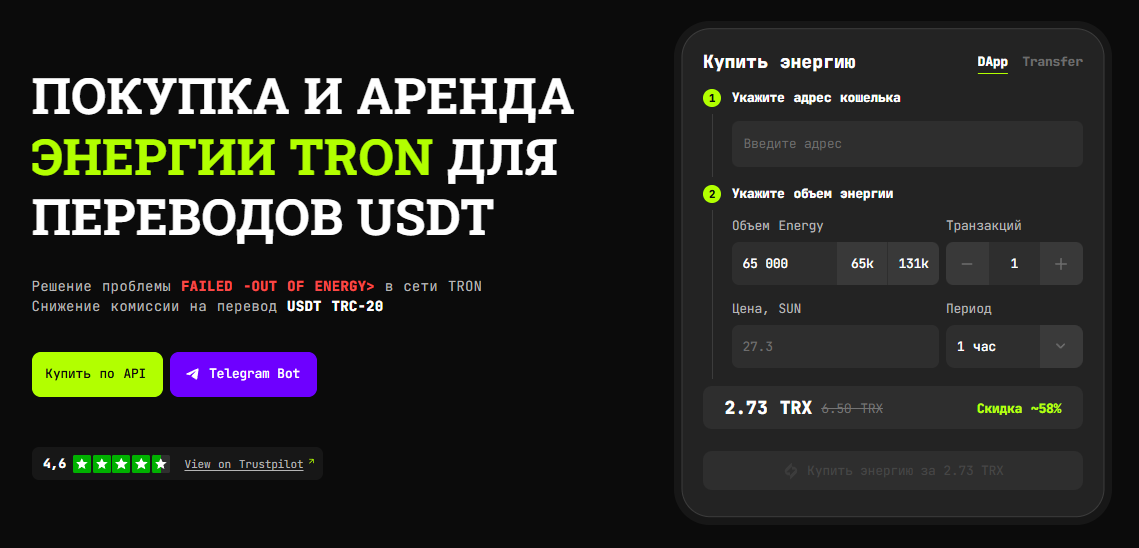
TronLink energy rental via FeeSaver is designed so that the user does not have to leave the familiar wallet interface. Simply copy the account address directly from TronLink and paste it into the form on the service's website, or go to the Telegram bot. Next, specify the amount of energy you need. It can be calculated in advance based on the number of planned transfers. The system immediately shows the rental cost, which in most cases is noticeably lower than burning TRX directly for the same operation. Payment confirms the order, and the address is queued for the resource to be credited. You can read more about using the bot in a separate article.
How to Check That Energy Has Arrived
After placing the order, open the resources section in TronLink and make sure the energy value has increased by the amount ordered. If the data does not update right away, you can refresh the wallet manually, or check via a public TRON blockchain explorer by entering the account address. Crediting usually takes just a few minutes, and delays at this stage are rare. Only once the arrival is confirmed should you proceed to the USDT transfer itself. That way you do not risk having TRX deducted the old way.
How to Send USDT After Receiving the Resource
Once the energy has been credited, a USDT transfer in TronLink goes through as usual via the token sending section. The user enters the recipient address and the amount and confirms the transaction. The wallet automatically uses the available resource instead of deducting TRX. The final fee is shown right in the confirmation window before sending. If there is enough resource, the TRX amount to be deducted will be zero or minimal. This check takes seconds but saves you from unpleasant surprises after confirming the transfer.
What Happens to Energy After the Transaction
The used portion of energy is deducted immediately and is not returned to the user until it recovers naturally. If the resource was obtained through staking, its amount gradually replenishes over a daily cycle, and the next day part of the energy becomes available again. Energy delegated through rental works differently. It is valid for a set period, after which it simply stops being credited to the address, whether it was used or not. That is why it is important to match the rental amount to the actual number of transfers rather than ordering the resource with a large reserve for the future.
Figuring out how to get TRON energy for regular USDT transfers is not difficult. It is enough to understand the difference between owned and delegated resources. Active TronLink users should maintain a base amount of energy through modest staking and cover peak load with quick rental from an external service. This approach saves money without permanently freezing large amounts of TRX and without the risk of the resource not recovering in time before an important transfer.
If you regularly send USDT through TronLink and want to cut your fee costs, enter your account address in FeeSaver and get the Energy you need to your TronLink address in a few minutes.
-
Why is Energy needed in TronLink?
Energy is consumed when executing smart contract operations on the TRON network, including USDT TRC-20 transfers.
-
Where can I see Energy in TronLink?
The available amount of Energy and Bandwidth can be viewed in the resources section of your TronLink account.
-
What happens if there is not enough Energy?
If there is not enough Energy, the network uses TRX to pay for the missing transaction resources.
-
How do I get Energy for TronLink through FeeSaver?
Copy your TronLink wallet address, enter it in FeeSaver and choose the amount of Energy you need. After payment, the energy will be delegated to that address.
-
Can rented Energy be used for a USDT transfer?
Yes. Once the Energy arrives at your TronLink address, it can be used to pay for resources when transferring USDT TRC-20.
More articles
Go to blog


Every transaction
without FeeSaver — is an overpayment
Connect your addressright now and start saving!
Comments (0)